Remove Numbers from Joomla Category View
By default joomla shows a number by each article when listing all the titles in a category view layout.
Here’s how to remove the numbers…
Navigate to /components/com_content/views/category/tmpl/**default_items.php **and download the file.
To overide the file we need to copy it to the template folder. If it doesn’t already exist, create the folder:
/templates/yourtemplatename/html/com_content/category/
Open up the file and locate the line:
pagination->getRowOffset( $item->count ); ?>Comment it out by changing it to:
pagination->getRowOffset( $item->count ); ?>-->This will remove the numbers by each article.
To remove the # in the head, locate the line:
And replace with:
-->If you want to reduce the width of the column, just reduce the 5% in the line above to 1%
Save the file and upload it to
/templates/yourtemplatename/html/com_content/category/default_items.php
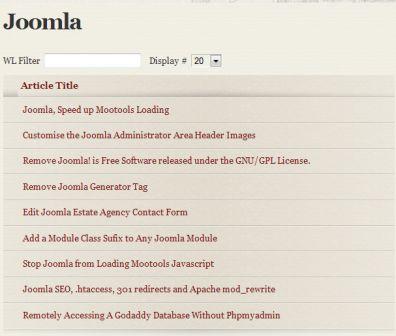
It should now look something like this